On many of the IBM i systems I come across, SSH was installed and enabled years ago. Everyone uses it and nobody has ever looked at the sshd_config file since.
Understandably, on most IBM i systems, 5250 is still the primary way in. SSH tends to be the side door. However SSH is heavily used in context of modernization efforts. Most people know that the connection is encrypted, so it feels secure. But encrypted and hardened are not the same thing.
After one too many security audits where I opened the SSH config and saw the same untouched configuration, I figured it was worth writing down what needs to be done to harden an SSH configuration. It is standard SSH hardening, applied to IBM i.
Technical starting point
The config file you need:
Protocol
SSH version 1 had problems. Serious ones. The security community moved on from it in 2001. SSH2 is a different protocol altogether, with stronger integrity checks and better key support.
Set it explicitly:
I still find systems where this is not explicitly set, which means a client could theoretically negotiate down to something nobody should be using with production credentials.
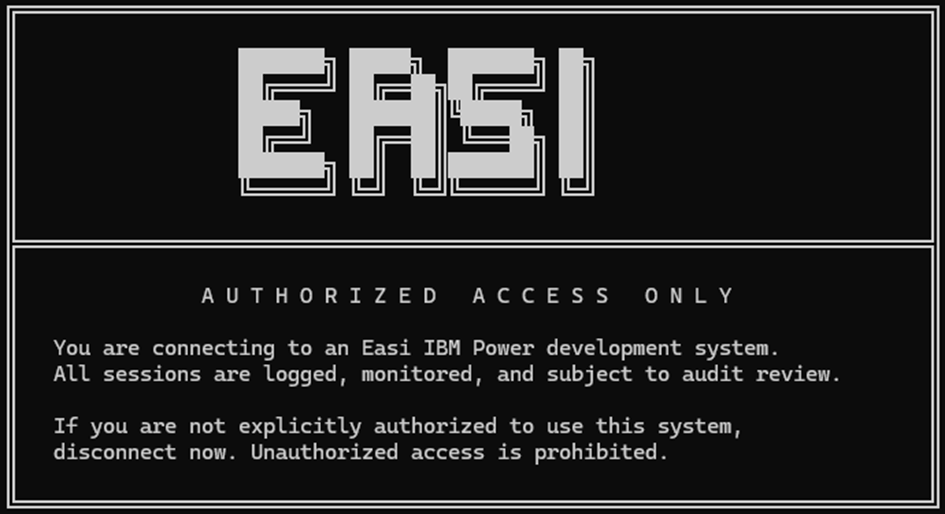
Show a banner before login
This one surprises people because it sounds like paperwork, not security. But a login banner creates a clear moment before authentication where the user has been notified of the rules.
You create the banner file yourself and can get creative, or just work with whatever text your legal or compliance team wants. The directive just points to it. During audits, this is one of those small things that either exists or does not, and I would rather it exists.
This is the login banner on one of our development systems:
Turn off host-based authentication
Host-based authentication trusts the machine, not the person. If host A is trusted, any user on host A could potentially connect to host B without going through normal user authentication.
Force key-based authentication
Password logins over SSH are the first thing attackers probe. Disable them and require keys instead. Block empty passwords and root login while you're at it. (Note: make sure to configure & test key-based access first or you lock yourself & your colleagues out of SSH.
Limit how many times someone gets to guess a password
MaxAuthTries limits how many authentication attempts are allowed on a single connection before it is dropped.
Once the number of failures reaches half that value, the system starts logging to syslog, which gives you a signal that something is going on.
Thirty seconds is enough time to authenticate; three attempts per connection limit brute-force guessing without locking out careful admins.
Not everyone needs SSH access
This is the one that gets the most pushback, and it is also the one that matters most.
By default, if a user profile exists on the system, they can probably SSH in unless you say otherwise. IBM i OpenSSH gives you four knobs:
| Directive | What it does |
| AllowUsers | Only these users may connect |
| AllowGroups | Only members of these groups may connect |
| DenyUsers | Block specific users from connecting |
| DenyGroups | Block specific groups from connecting |
You need at least one of these configured. Use profile and group names, not numeric IDs, and skip wildcards. My preference is normally to define AllowUsers and AllowGroups. This locks out all users and groups that are not explicitly defined.
Example:
Disable forwarding and tunnels
Unless someone on your team genuinely needs TCP tunnels, turn them off. They expand what a compromised session can reach.
Restart the daemon or nothing happened
Editing sshd_config does nothing until the SSH daemon picks up the changes. Restart sshd after your edits. Batch the changes and restart once if you prefer. This is done from the IBM i side:
Closing note
None of these settings require a security consultant or a week of project time. They are the kind of changes you make during a maintenance window, test on a non-production partition first, and then roll out.
If you have any questions or remarks about the contents of this article, please feel free to reach out to us.
Good luck securing your IBM i SSH server.