Microsoft continues to expand the capabilities of Microsoft 365 Copilot. With the general availability of Copilot Cowork, organizations can now move beyond simple prompts and individual tasks towards a more agentic way of working with AI.
Instead of asking Copilot to complete one task at a time, users can now delegate entire business activities to an AI coworker that can reason, plan, use multiple tools and continue working autonomously.... Even after you've closed your laptop!
Let's take a closer look and answer some key questions:
- What exactly is Copilot Cowork?
- How does it differ from the Microsoft 365 Copilot many organizations are already using?
- How does it access and process your organization's data?
- And what should you know about security, governance and cost management before getting started?
Executive Summary |
1. What is Copilot Cowork?
Most users know Microsoft 365 Copilot as an AI assistant that helps them complete individual tasks.
You ask a question, request a summary, draft an email or create a presentation, and Copilot helps you get the job done faster.
Copilot Cowork introduces a fundamentally different way of working with AI. Rather than acting as a prompt-based assistant, it adopts an agentic approach: you delegate a business task, and the AI plans, reasons and executes the work on your behalf.
Unlike traditional Copilot interactions, Cowork can combine multiple AI models, maintain context throughout an entire process, use Microsoft tools where appropriate, and continue working autonomously in the background. You can assign a task, close your laptop, attend other meetings, and return later while Cowork has continued making progress.
Rather than focusing on a single task, Copilot Cowork is designed to support complete workflows and outcomes. It can combine multiple actions, retrieve information from different sources, maintain context throughout a process and help users achieve broader business objectives.
In other words, you are no longer simply asking questions, you are delegating work to an AI colleague.
| Microsoft 365 Copilot | Copilot Cowork |
| Answers prompts | Executes delegated tasks |
| Supports individual tasks | Supports complete business workflows |
| Requires user interaction | Can continue working autonomously |
| Uses AI to assist | Uses agentic AI to collaborate |
| Produces outputs | Delivers business outcomes |
2. What is the added value of Copilot Cowork?
The real value lies in its ability to support multi-step business processes.
Instead of helping an employee complete one task at a time, Copilot Cowork can assist throughout an entire workflow.
Imagine preparing for a customer meeting:
Rather than manually gathering information from emails, Teams conversations, CRM data, meeting notes and documents, Copilot Cowork can help consolidate relevant information, identify action points and prepare a complete briefing.
It can also use Microsoft 365 applications as tools to complete the task. For example, after gathering the necessary information, it can automatically prepare a PowerPoint presentation, draft supporting documentation in Word, or organise data in Excel; without requiring you to switch between applications yourself.
Other examples include:
- Assisting with employee onboarding processes
- Coordinating project follow-up activities
- Gathering information across departments
- Supporting sales and customer service workflows
- Helping employees navigate complex internal procedures
|
The goal is no longer simply to save a few minutes on individual tasks. The objective is to reduce friction across entire business processes and help employees focus on higher-value work. |
A selection of the external tools: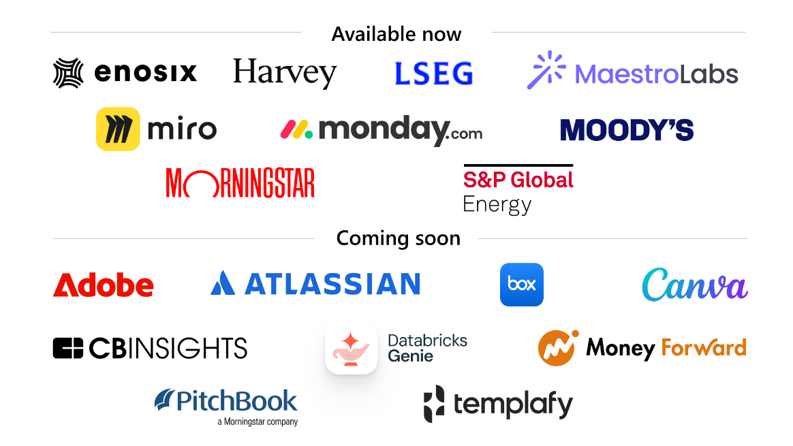 |
3. What data can Copilot Cowork access?
One of the most important questions organizations ask is:
"What data can Copilot access?"
The answer is straightforward: Copilot Cowork operates within the Microsoft 365 environment and respects the permissions already configured within your organization.
This means users can only access information they are already authorized to see.
Behind the scenes, Microsoft uses Work IQ to better understand the relationships between your organisation's data, conversations, documents and business context. This intelligence layer helps Copilot retrieve more relevant information across Microsoft Graph while still respecting existing permissions.
Copilot can retrieve information from sources such as:
- SharePoint
- OneDrive
- Microsoft Teams
- Outlook
- Microsoft 365 applications
- Connectors and approved third-party services configured by your Microsoft 365 administrator
The quality of the results therefore depends heavily on the quality, structure and governance of the underlying data.
Organizations with well-managed Microsoft 365 environments typically achieve better outcomes because relevant information is easier to find and access.
4. Is my data used to train Microsoft's AI models?
This remains one of the most frequently asked questions around Microsoft AI technologies.
Customer data processed through Microsoft 365 Copilot and Copilot Cowork is not used to train Microsoft's foundation AI models.
Your organization's data remains within your Microsoft tenant and stays protected by Microsoft's enterprise security, compliance and privacy commitments.
At the same time, organizations remain responsible for managing access rights, information classification and data governance.
AI respects existing permissions. If permissions are configured incorrectly, AI may simply make existing oversharing more visible.
Solutions such as Microsoft Purview can play an important role here by helping organisations classify sensitive information, enforce Data Loss Prevention (DLP) policies, apply sensitivity labels and strengthen AI governance before deploying Copilot at scale.
This is why governance remains a critical component of every successful AI strategy.
5. Why governance matters more than ever
Many organizations view AI as a technology project.
In reality, AI often becomes a data project.
The effectiveness of Copilot depends on the information it can access. As organizations start deploying more advanced AI capabilities, they frequently discover opportunities to improve:
- SharePoint permissions
- Data ownership
- Information classification
- Sensitivity labels
- Data Loss Prevention policies
- Document management practices
Managing information also means knowing what no longer needs to remain in active storage. Archiving outdated or inactive content can improve the relevance of AI-generated results while simultaneously reducing Microsoft 365 storage costs. Good information lifecycle management benefits both AI quality and cost optimisation.
The organizations that achieve the greatest value from AI are typically those that first establish a strong foundation for security and governance.
6. Understanding Copilot Credits
Unlike Microsoft 365 Copilot, which is licensed per user, Copilot Cowork introduces a usage-based pricing model built around Copilot Credits. Every task you delegate consumes credits, with the total depending on four factors: the AI model used, the amount of context retrieved, the number of tool calls, and the runtime required to complete the task.
To help organisations estimate their costs, Microsoft groups workloads into three representative categories:
- Light tasks typically involve a limited amount of context, minimal reasoning and few or no tool calls. Examples include summarising a meeting, drafting a short email or retrieving information from a handful of documents.
- Medium tasks require more context and reasoning, often combining information from multiple sources or using one or more Microsoft 365 tools to produce a deliverable such as a report or presentation.
- Heavy tasks are long-running, agentic workflows that may retrieve large amounts of information, use multiple AI models, invoke several tools or external systems, and generate multiple outputs. Think of preparing a complete customer briefing with supporting documents, analysing hundreds of files, or coordinating a complex business process from start to finish.
Because Copilot Cowork operates on a Pay-As-You-Go (PAYG) model, cost management becomes an essential part of AI governance. Organisations don't simply enable Cowork for everyone by default: an administrator must first configure usage-based billing and approve access. They can then define spending budgets, monitor credit consumption and even apply per-user or organisational limits to keep AI costs predictable as adoption grows.
This approach gives organisations the flexibility to scale AI usage according to business value while maintaining full visibility and control over operational costs. For businesses planning to deploy Copilot Cowork at scale, governance should therefore cover not only data and security, but also ongoing AI cost management.
7. Is Copilot Cowork right for your organization?
Organizations already using Microsoft 365 Copilot are often the best candidates to explore Copilot Cowork.
It can be particularly valuable for businesses that want to:
- Increase the return on their Copilot investment
- Streamline repetitive business processes
- Improve employee productivity
- Explore AI-driven workflows and agents
- Build a structured AI roadmap
The key is not simply enabling new technology, but identifying where AI can create measurable business value.
The next step in your AI journey
Copilot Cowork represents another important milestone in Microsoft's vision for AI in the workplace.
The focus is gradually shifting from isolated productivity improvements toward AI-assisted workflows that help employees achieve complete business outcomes.
Organizations that combine AI adoption with strong governance, security and data management will be best positioned to unlock the full potential of these new capabilities.
Not sure whether your organisation is ready for Copilot Cowork?
Easi's Microsoft specialists can help you assess your AI maturity through our Discovery, Readiness and Adoption tracks.
Together, we help you prepare your data, governance and Microsoft 365 environment before scaling AI across your organisation.
👉 Contact us for tailored guidance
 |
 |
.png?width=200&height=200&name=CJAN%20(2).png) |
|
Roel De Graaff |
Robbe Matthijs |
Cloë Janssens |
Join our upcoming AI-event: